Clime: NOAA Weather Radar Live
- 4.2
- Rating
- 10.00M
- Installs
- Free
- Price
 Analysis by App-foxy
Weather apps are easy to judge until you need one for a real decision: whether to leave for work now, take a longer route around a storm, protect outdoor equipment, or decide if a weekend plan is still sensible. I spent time using Clime: NOAA Weather Radar Live with that practical mindset, focusing less on decorative forecast screens and more on how useful its radar view feels when conditions are changing. My overall impression is that it is a capable weather app for people who want visual, near-real-time storm information rather than only a temperature and a small weather icon.
Clime comes from Mosaic Srl and sits in the weather category. It is free to install, suitable for Everyone, and has grown into a widely used service with over ten million installs. Its average rating is 4.2 from around 421 thousand ratings, which suggests a generally positive reception while also leaving room for the kind of individual frustrations that often appear in weather apps: advertising, locked extras, notification overload, or forecasts that cannot match the speed of a changing storm.
How Clime feels in everyday use
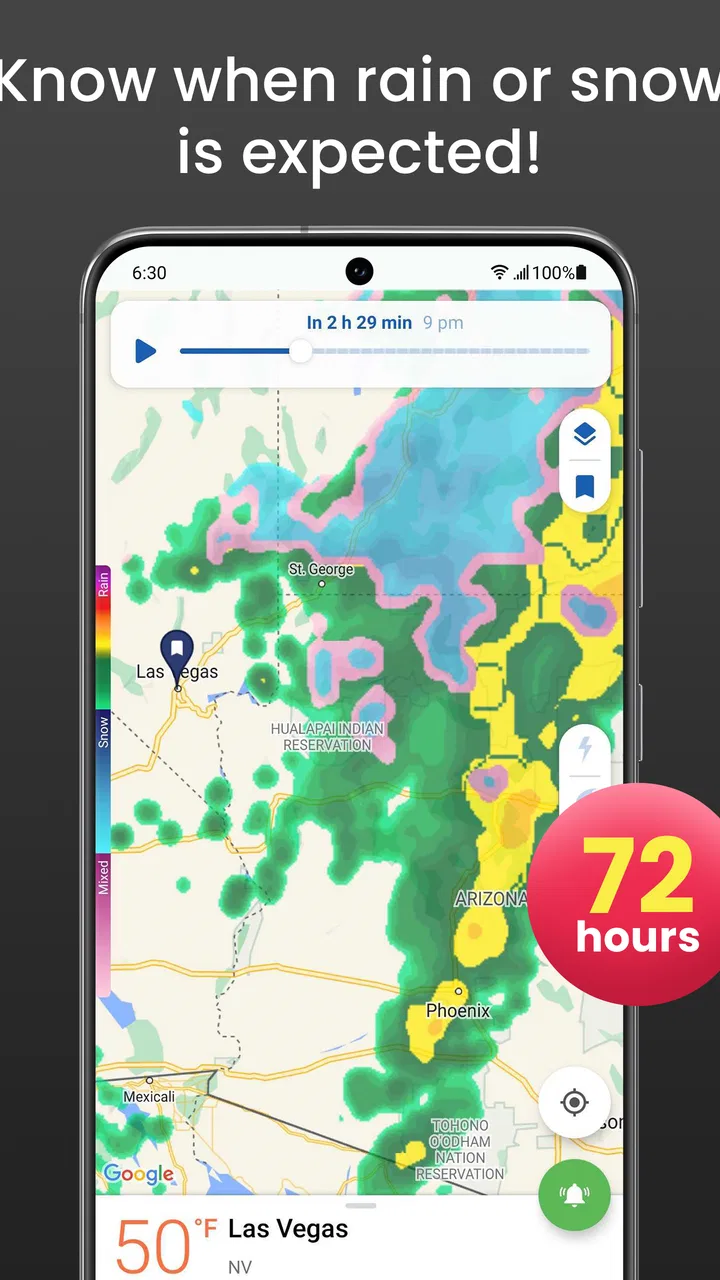
The central experience is the map. Instead of making me read a list of hourly temperatures first, Clime puts the movement of weather systems in front of me. That is particularly helpful when rain is approaching from a nearby area and the ordinary forecast still says something vague such as “possible showers.” A radar animation gives me a better sense of direction and timing, even though I still treat it as guidance rather than a promise.
You May Also Like

 Blood Strike: 2.5 Anniversary
Blood Strike’s Loadouts Turn Every Drop Into a Tactical Gamble
A close look at Blood Strike’s custom loadouts: how fast access to signature weapons reshapes its battle royale rhythm, rewards preparation, and narrows the gap between fights.

 Pandora - Music & Podcasts
Pandora’s Music Is Easy to Start, but Harder to Recover
Pandora’s strength is its low-effort path from a seed to a station. Its weak spot is how much confidence it asks you to place in connection, setup, and quiet recovery.

 8 Ball Pool
 Is Built on Rivalries, Rematches, and Routine
A close look at the rivalries, rematches, shared routines, and unanswered safety questions that turn a quick pool match into a persistent mobile community.

 Samsung Music
’s Quiet Strength Is Playing What You Already Own
Its reach comes less from spectacle than from dependable access to a personal library. That simplicity is both the app’s strongest retention engine and its ceiling.

 AccuWeather: Weather Radar
AccuWeather Review: A Quick, Clear Forecast for Everyday Decisions
For everyday plans, the best forecast is the one you can understand quickly. AccuWeather makes rain timing, radar, and local conditions easy to act on, with a few trade-offs.

 Hill Climb Racing
Why Hill Climb Racing Still Turns Crashes Into One More Run
A tiny car, a bumpy hill and one more upgrade: Hill Climb Racing keeps resurfacing because its simple chaos makes every near-miss feel personal.
More From Our News Desk
View All News


I found this visual approach most useful before short trips. If I am about to walk somewhere, cycle, drive, or pick up groceries, I can check whether a band of precipitation is moving toward my area or away from it. That is a different question from “What is today’s forecast?” and the map answers it more naturally. It also helps when the weather changes faster than a morning forecast can communicate.
The app’s NOAA radar focus is an important part of its identity. Users who live in areas covered well by that radar information may get more practical value from Clime than from a basic phone weather widget. A widget is excellent for a quick glance, but it usually cannot show the shape and movement of a storm system with the same clarity. I would still keep a simple widget for convenience, but I would open Clime when precipitation timing actually mattered.
That distinction also explains who should consider it. If you only want the current temperature, sunrise time, or a simple seven-day outlook, Clime may feel more elaborate than necessary. If you regularly make decisions around rain, storms, travel, outdoor work, or changing local conditions, the map gives the app a stronger reason to exist on your phone.
The radar is valuable when timing matters
A useful habit is to watch the radar animation for a short period instead of looking at one frozen frame. The direction of movement can reveal whether a shower is likely to pass over your location soon or remain nearby without reaching you. I would not use that animation to calculate an exact departure minute, but it can support a sensible choice: leave now, wait a little, or bring proper protection.
This is one of the app’s less obvious strengths. Many weather services present a forecast as if it were a fixed answer. Clime encourages me to think in terms of movement and uncertainty. A storm is not merely “there” or “not there”; it is developing, traveling, weakening, or expanding. That way of reading weather is more useful for immediate decisions than a static daily icon.
There is a trade-off, though. Radar interpretation takes a little attention. Colors and animation can look dramatic, and it is easy to assume that a bright area means my exact street will soon receive severe weather. I recommend checking the scale, watching the motion, and comparing the map with the written forecast. The app can make weather easier to understand, but it cannot remove the uncertainty built into short-term prediction.
Notifications need a deliberate setup
Weather alerts can be useful, but I would not enable every notification without thinking about how I want the app to behave. A phone that announces every minor change quickly becomes noisy, and excessive alerts make important warnings easier to ignore. I prefer notifications that support a specific purpose, such as keeping an eye on conditions near home or preparing for a day outdoors.
This is a practical workflow for existing users: first decide which locations genuinely matter, then keep only the alerts that help with a decision. A home location, a workplace, and a frequently visited area may be enough. Adding every destination can turn a helpful weather tool into a stream of interruptions. The best experience comes from treating notifications as a filter, not as a complete substitute for opening the radar.
People should also remember that an alert is not the same as a guarantee of local impact. Weather boundaries can be uneven, and a warning covering a broad area may not describe conditions at one particular address. I see notifications as prompts to check the map and local forecast, especially before driving or planning outdoor activity.
Where it fits beside ordinary weather apps
Compared with the default weather app on a phone, Clime is more focused on situational awareness. The default option usually wins for speed: tap once, read the temperature, and move on. Clime wins when I need to understand what is happening around that basic number. Its radar-centered design gives it a clear role rather than making it just another forecast list.
Compared with a general weather website, the app is more convenient for repeated checks. I do not need to open a browser and rebuild the same search each time. The dedicated interface makes sense for someone who checks conditions several times a day, although that convenience is less important for a casual user who only looks at tomorrow’s forecast once in the morning.
Compared with specialist severe-weather tools, Clime feels more approachable. It is not something I would treat as my only source during a serious emergency. For urgent safety decisions, official local alerts and emergency guidance should take priority. Clime is better understood as a practical everyday layer: it helps me notice approaching conditions and decide when to investigate further.
What the current version means for users
The current version is 1.72.7, and the app was released on May 4, 2016. That long presence matters because weather apps have to survive changing operating systems, shifting data services, and evolving user expectations. I see the current release as part of a mature product rather than a brand-new experiment. It is available for devices running Android 8.0 or later, so anyone using an older phone should check compatibility before planning around it.
For someone already using Clime, a current version number is most relevant when deciding whether an update is worth installing. In a weather app, improvements are not always visible as a new headline feature. Stability, map loading, notification reliability, and compatibility can matter more than a redesigned button. I would keep the app updated through the normal store process, especially if radar or alerts are important to my routine.
At the same time, I would not assume that a newer version makes every weather reading more accurate. An app update can improve the way information is displayed or delivered, but it cannot turn an uncertain forecast into certainty. The quality of the experience depends on location, coverage, timing, and the nature of the weather itself. That is why I judge Clime mainly by how clearly it helps me interpret conditions, not by whether every shower arrives at the exact minute I expected.
Existing users may also notice that the free experience is not the whole product. Clime is free to download, while in-app purchases range from $0.99 to $81.99 per item. That broad range indicates that optional paid elements can be part of the experience, so I would inspect the screen carefully before confirming anything. A free installation is useful for trying the core workflow, but it should not be confused with every feature being free.
My advice is to test the app during ordinary weather before deciding whether any paid option is worthwhile. Open the map, follow a passing shower, review the forecast presentation, and see whether the available alerts match your habits. If the free experience already answers your questions, paying for extras may not improve your daily routine. If you rely on the app frequently, then the decision should be based on reduced friction rather than on the assumption that a purchase automatically means better forecasting.
A realistic day with the app
Imagine that I have planned a late-afternoon outdoor appointment. The morning forecast says there may be rain, but that information is too broad to guide me. Around lunchtime, I open Clime and look at the radar animation. A narrow area of precipitation is moving toward my location, while a larger system appears farther away. I can then compare the movement with the timing of my appointment, decide whether to leave earlier, and pack a rain jacket instead of guessing from the daily icon.
If the map shows the rain weakening or passing to one side, I might keep the plan while staying flexible. If it is intensifying and moving directly toward the area, I have a reason to change the plan or allow extra travel time. The app has not made the decision for me; it has given me a more useful piece of evidence than a single percentage in a forecast list.
For commuters, the same approach works before leaving home. For parents, it can help with school pickup or outdoor activities. For people who work outside, radar movement may be more relevant than a weekly forecast. For travelers, the ability to inspect a destination visually can be helpful before setting out, although I would still check local official information for unfamiliar or hazardous conditions.
Small habits that make the map more useful
One of my strongest recommendations is to avoid checking only when the sky already looks threatening. Looking at the map during calm conditions gives me a reference point and makes later movement easier to understand. I can see how quickly weather tends to travel through my area and avoid overreacting to a single colored patch.
A second useful habit is to use Clime for a short-term question, not as a replacement for every other source. “Will rain reach me soon?” is a good radar question. “Will this entire weekend be comfortable?” is better answered with the broader forecast. Mixing those two purposes is a common source of disappointment because radar is strongest for immediate movement, while longer-range forecasts naturally carry more uncertainty.
A third is to compare the map with what I can observe outside. If the radar suggests precipitation nearby but the sky is clear, that does not automatically mean the app is wrong. The precipitation may be light, delayed, evaporating, or outside my precise location. Conversely, local weather can develop between updates. Combining the visual display with observation makes me a better user of the tool.
Where the experience still falls short
The biggest limitation is not unique to Clime: weather information can be precise in appearance without being precise at street level. A detailed map may create confidence that the underlying conditions cannot fully support. I would be cautious about using it alone for safety-critical decisions, especially when storms, flooding, lightning, or dangerous travel are involved.
The second issue is the possible friction around paid features. The free price makes trying the app easy, but optional purchases can complicate the experience for people who want a clean, no-cost utility. I would be especially careful when setting up the app for a child or an older family member, since the Everyone rating describes content suitability, not necessarily the absence of purchase prompts or ongoing attention.
Another limitation is that a radar-first interface may be more information than some people want. If my only question is the current temperature, opening a map feels like extra work. A lightweight forecast app or the phone’s built-in weather panel may be the better choice for that use case. Clime earns its place when the map changes what I do.
I also would not choose it as my sole travel-weather solution in a place where I need authoritative local warnings. The app can help me visualize conditions, but official agencies remain the right reference for emergency instructions. This is not a criticism of the basic concept; it is a sensible boundary for any consumer weather app.
Who should install it, and who should skip it
I would recommend Clime to commuters who regularly face fast-changing rain, outdoor workers who need a visual check before starting a task, families planning short outdoor activities, and anyone who finds ordinary forecast icons too vague. It is also a good fit for people who naturally think in maps and movement rather than isolated numbers.
I would skip it if I want nothing more than a quiet temperature widget, if I dislike animated weather maps, or if I am unwilling to review optional purchases and notifications. People who need highly specialized aviation, marine, agricultural, or emergency forecasting should look for tools designed specifically around those professional requirements instead of expecting a general app to cover them.
The app is also less compelling for users with older devices below Android 8.0, since the current compatibility requirement rules those phones out. For everyone else, the sensible approach is to install it, test the radar during a few ordinary weather changes, and decide whether its visual information genuinely improves daily choices.
What I would watch as the product continues
Because the app has been available since 2016 and now sits at version 1.72.7, I would watch how Mosaic Srl balances maturity with simplicity. The most meaningful future progress would not necessarily be more screens. I would value clearer explanations of radar timing, calmer alert controls, transparent handling of optional purchases, and an interface that helps new users understand what the colors and animations actually mean.
I would also pay attention to how well the experience serves both quick checks and deeper investigation. A radar enthusiast may want layers and movement, while a casual user needs an answer in seconds. The strongest direction would preserve the map’s usefulness without making the first screen feel crowded or demanding.
For current users, the practical signal to watch is whether updates make the app more dependable in the moments that matter: when a storm is nearby, when a notification arrives, or when the map needs to load quickly before leaving home. Those improvements would affect my opinion more than cosmetic changes.
After using it as an everyday weather companion, I see Clime as a focused and worthwhile option rather than a universal replacement for every forecast service. Its best feature is the way it turns nearby weather into something I can observe and reason about. Its weaknesses are the unavoidable uncertainty of radar, the potential distraction of optional purchases and alerts, and the fact that a detailed map is unnecessary for simple temperature checks.
My recommendation is straightforward: choose Clime if you want to understand approaching weather, not merely read it. Keep a basic weather shortcut for instant conditions, use official warnings when safety is involved, and let this app handle the visual, short-term questions. Used that way, it adds practical context to a phone’s weather toolkit and gives me better information for everyday decisions without pretending to predict the sky perfectly.
FAQs for Clime: NOAA Weather Radar Live
01What features does Clime: NOAA Weather Radar Live offer?
Clime: NOAA Weather Radar Live provides real-time weather radar, customizable weather alerts, and detailed forecasts. Users can view current conditions, precipitation maps, and severe weather warnings. The app also offers satellite imagery, temperature overlays, and a widget for at-a-glance updates, making it a comprehensive tool for staying informed about weather changes.
02Is Clime: NOAA Weather Radar Live free to use?
Clime offers a free version with basic features, but access to advanced functionalities requires a subscription. The premium version includes features like extended forecasts, removal of ads, and enhanced radar imagery. Users can choose between different subscription plans, providing flexibility based on their needs and budget.
03How accurate is the weather information provided by Clime?
Clime sources its data from NOAA and other reliable meteorological organizations, ensuring high accuracy. However, like any weather app, predictions can occasionally be off due to rapidly changing weather conditions. The app is generally considered reliable for short-term forecasts and provides timely updates for severe weather alerts.
04Can I customize weather alerts in Clime?
Yes, Clime allows users to customize weather alerts to suit their preferences. You can set notifications for severe weather events, temperature changes, or precipitation. This customization ensures you receive only the alerts relevant to your location and interests, helping you stay prepared for any weather situation.
05Is Clime compatible with both Android and iOS devices?
Clime: NOAA Weather Radar Live is available on both Android and iOS platforms. The app is designed to function seamlessly across devices, ensuring a consistent user experience. Regular updates are released to maintain compatibility with the latest operating systems, providing users with a smooth and efficient interface.
Pros
- Real-time weather updates keep you informed.
- Interactive radar maps are easy to use.
- Severe weather alerts ensure timely warnings.
- Customizable notifications for specific locations.
- Accurate forecasts for planning ahead.
Cons
- Some features require a subscription.
- Occasional app performance lags.
- Advertisements in the free version.
- Location accuracy can vary.
- Battery consumption is relatively high.

Clime: NOAA Weather Radar Live
Gallery